How we built a local-first AI application on Windows and NVIDIA hardware.
AIWF Studio is an active local AI application, not a benchmark claim or finished universal appliance. This note explains the current architecture, the constraints that shaped it, and the checks that matter when local AI has to behave like software rather than a one-off notebook.
The actual product problem
Running one model locally is not the same as operating a local AI application. A usable product has to resolve model paths, optional engines, device state, precision, memory pressure, settings, output storage, logs, and user-visible failure states. Creative AI adds more variation because image, inpaint, video, audio, and post-processing routes do not share one safe global configuration.
The design goal became straightforward: keep the local execution path visible without forcing the user to assemble every backend by hand.
Separate the product surface from the inference engines
The production interface uses React. FastAPI provides the application and route layer for bootstrap state, capabilities, settings, logs, data, generation, and workflow operations. Model families and engines sit behind explicit loaders and service boundaries.
This separation lets the interface report that an optional engine is missing without presenting the entire application as broken. It also keeps family-specific precision, attention, offload, and loader behavior out of one global switch.
Treat runtime visibility as a feature
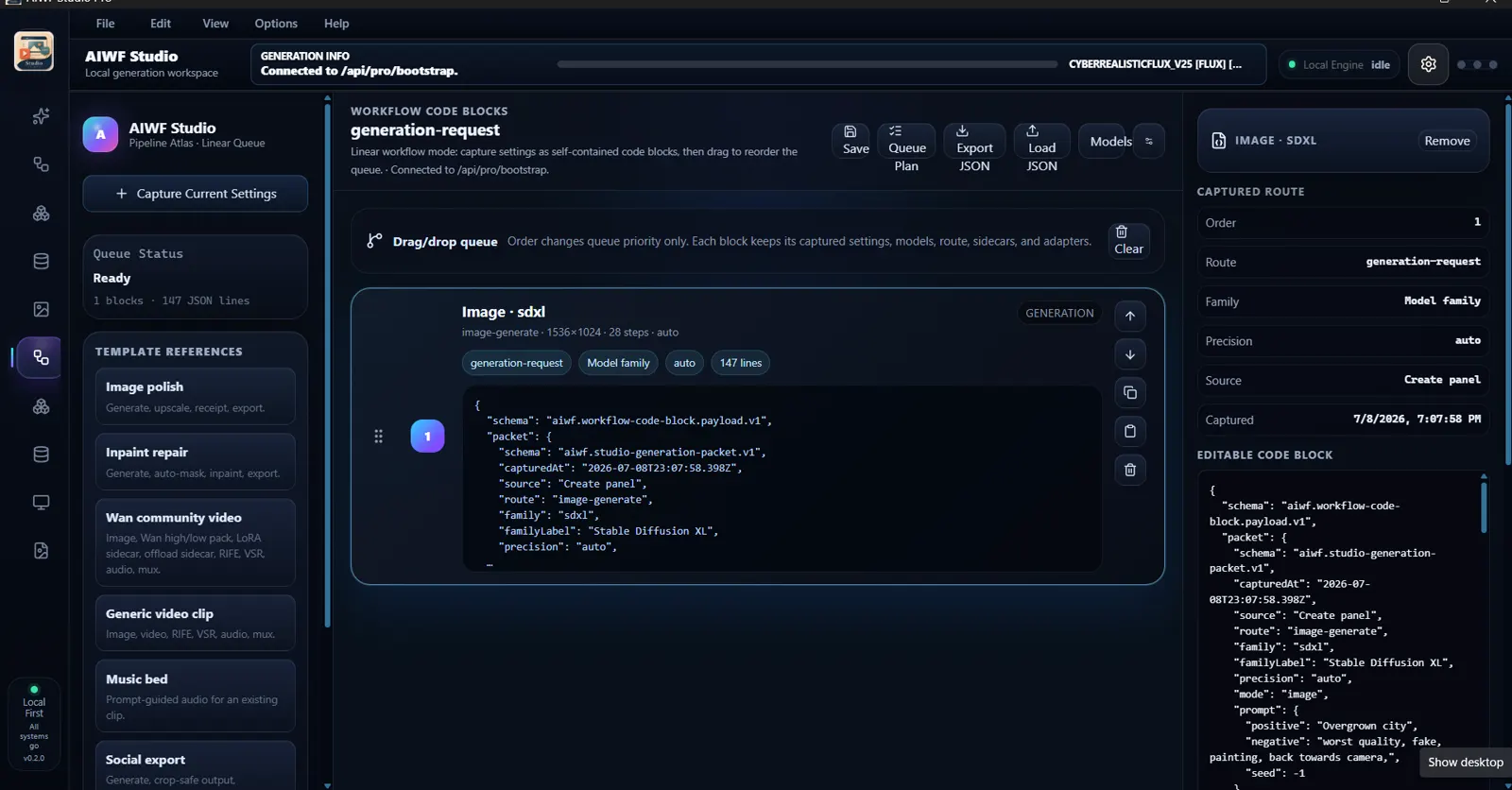
A local user needs to see which backend is active, whether the engine is idle or busy, what device was selected, what model is loaded, and how much memory is available. The current UI exposes those states alongside the work instead of hiding them in a terminal.
That visibility is not decorative. It shortens failure diagnosis and makes a screenshot or handoff materially more useful.
Capture work as a receipt, not only an output
AIWF Studio can capture generation settings into workflow blocks. The block carries route, family, precision, model, sidecar, and other request context. Blocks can be reordered without pretending that the underlying captured settings changed.
The broader principle applies beyond creative AI: if a result matters, preserve enough configuration and source context to explain how it was produced.
Windows installation is part of the product
A documented clean-install pass created a Python 3.10 environment, installed CUDA PyTorch and runtime requirements, downloaded the default model, built the React frontend, created shortcuts, and reached the local Pro API and UI. The test also confirmed an important failure behavior: an optional NVIDIA media SDK could be absent without blocking the core install.
One passing install does not prove every Windows machine will work. It does prove the installation path can be tested as a first-class workflow with version receipts rather than treated as README optimism.
What remains difficult
Hardware variation remains the largest practical constraint. GPU generation, video, and model loading are affected by VRAM, RAM, storage, driver, requested resolution, precision, attention implementation, and model family. Optional SDKs and native dependencies add another compatibility layer.
The project also contains both a production React path and broader experimental lab surfaces. They should not be described with the same maturity label. A stable downloadable package remains intentionally unlinked until a versioned release clears installation, license, and smoke checks.
What this proves for client work
AIWF Studio does not prove that every private AI workflow is ready for production. It proves that the team is already working through the unglamorous parts of local AI: runtime state, model-family differences, hardware limits, interfaces, installers, logging, receipts, and explicit failure paths.
That is the reason a client pilot starts with one workflow and one representative environment. The useful result is not “AI works.” The useful result is a tested answer about whether this workflow works within these data, hardware, user, and operating boundaries.